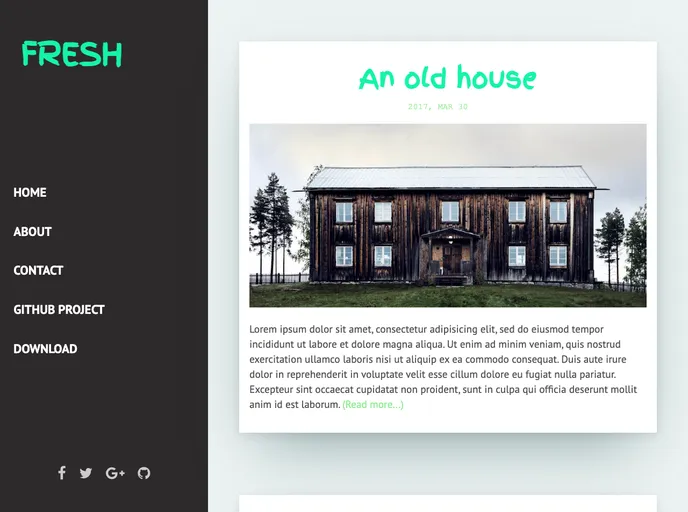
Overview:
Fresh is a free blog template for Jekyll. It offers a clean and modern design that is perfect for creating a blog or personal website. With Fresh, users can easily showcase their content in an attractive and professional manner. This template is built using Jekyll, a static site generator, making it easy to customize and maintain.
Features:
- Integrations: Fresh supports integrations with popular tools such as Google Fonts, Disqus, and Font Awesome, allowing users to enhance their blog with customizable fonts, commenting functionality, and icons.
- Google Fonts: Users can choose from a wide variety of Google Fonts to personalize the typography of their blog and create a unique look and feel.
- Disqus: Fresh integrates with Disqus, a popular commenting system, enabling users to engage with their audience by allowing them to leave comments on blog posts.
- Font Awesome: With Font Awesome integration, users can easily add icons to their blog, enhancing the visual appeal and user experience.
- Social media links: Fresh provides built-in support for social media links, allowing users to easily connect their blog with their social media profiles and encourage social sharing of their content.
Installation:
To install the Fresh blog template for Jekyll, follow these steps:
- Install Jekyll by following the instructions on jekyllrb.com.
- Download the Fresh template from github.com.
- Extract the downloaded zip file to a directory on your computer.
- Open a command prompt or terminal window and navigate to the directory where you extracted the template files.
- Run the command
bundle install to install the required dependencies. - Edit the
_config.yml file to customize the settings of your blog, such as the site title, description, and social media links. - Create your blog posts by creating Markdown files in the
_posts directory. Refer to the Jekyll documentation for details on how to write blog posts. - Run the command
bundle exec jekyll serve to start the Jekyll server and preview your blog locally. - Open your web browser and visit
http://localhost:4000 to view your blog.
Summary:
Fresh is a free blog template for Jekyll that offers a clean and modern design. It provides several key features such as integrations with Google Fonts, Disqus, and Font Awesome. With easy installation and customization options, Fresh is a great choice for anyone looking to create a stylish and functional blog or personal website using Jekyll.