Overview:
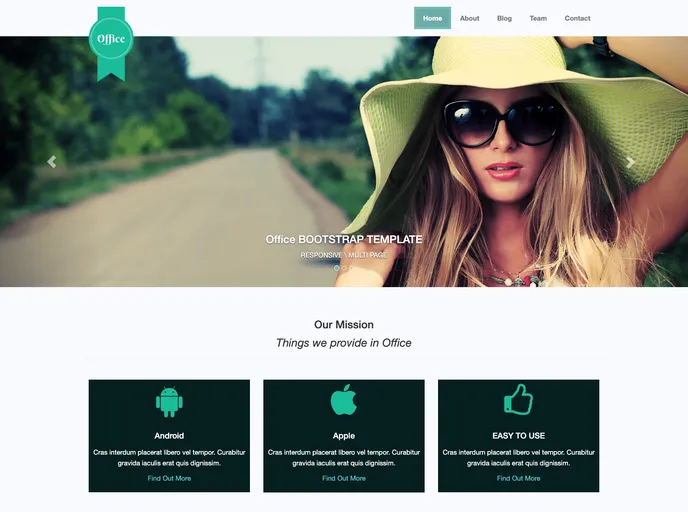
The Business Jekyll Theme is a versatile theme designed for small and medium-sized businesses. Originally created by Technext, it has been ported over to Jekyll by Melvin Ch’ng. Unlike most Jekyll themes, this is not a single page theme but rather a package that can be used for a business website or to promote specific projects. The theme features a responsive layout, utilizes the Bootstrap 3 CSS Framework, and includes beautiful icons from Fontawesome. The coding is well-commented and easy to use, making it a great choice for those new to Jekyll. Best of all, it is available for free.
Features:
- Responsive layout: The theme is designed to adapt and display properly on different screen sizes.
- CSS Framework - Bootstrap 3: Utilizes the widely-used Bootstrap 3 framework for consistent styling and layout.
- Beautiful icons by Fontawesome: Includes a collection of stylish icons from Fontawesome to enhance the visual appeal of the site.
- Clean, simple, and elegant: The design is minimalistic and visually appealing, ensuring that the focus is on your content.
- Multi page template: This theme supports multiple pages, allowing for more organized and detailed content.
- Well-commented and structured coding: The code is easy to understand and modify, even for those with limited coding experience.
- Easy to use: The theme is designed to be user-friendly, making it accessible for beginners.
- It’s free!: The theme is available for free, making it an affordable choice for small and medium-sized businesses.
Installation:
To install the Business Jekyll Theme, follow these steps:
- Install Ruby and Rails if you haven’t already. You can refer to a tutorial (link excluded) for installation instructions for Windows, Linux, and MacOS.
- Install Jekyll by running the command
gem install jekyll in your command line interface. - Navigate to the root directory of your folder.
- Start your localhost server by running the command
jekyll serve. - Access your site at
localhost:4000 in your web browser. - For additional information about Jekyll, visit the official website.
Summary:
The Business Jekyll Theme is a versatile and visually appealing theme for small and medium-sized businesses. It offers a responsive layout, utilizes the Bootstrap 3 CSS Framework, and includes beautiful icons from Fontawesome. The theme is easy to install and use, with well-commented and structured coding. Overall, it is a user-friendly and affordable option for businesses looking to build or improve their online presence.